

Key Takeaways
Option A
Fixed Wireless Internet
The cable-free broadband delivered over radio waves.
Best for: Households in suburban or rural areas where cable infrastructure is limited or unavailable.
Option B
Cable Internet
The established wired broadband using coaxial cable networks.
Best for: Urban and suburban households seeking consistently high speeds and wide provider availability.
If you live in a rural or underserved area with no cable infrastructure
Fixed Wireless Internet
Fixed wireless can deliver broadband-class speeds without requiring cable lines, making it one of the most practical options where cable doesn't exist.
If you work from home and rely on stable, high-speed uploads for video calls or file sharing
Cable Internet
Cable's wired infrastructure typically delivers more consistent speeds and lower latency, which matters for bandwidth-intensive remote work.
If you want to avoid long installation waits or service contracts
Fixed Wireless Internet
Fixed wireless installations are often simpler, requiring a rooftop or window-mounted antenna rather than extensive in-home cable wiring.
If your household streams 4K video, games online, or has many connected devices simultaneously
Cable Internet
Cable plans commonly offer higher bandwidth tiers that handle heavy multi-device use more comfortably than many fixed wireless plans.
If you're in a suburb where both options are available and cost is a priority consideration
Fixed Wireless Internet
Depending on local competition, fixed wireless plans can be priced comparably to cable while eliminating the need for technician-run cable work inside the home.
How Each Technology Actually Works
Understanding what sits behind each service helps set realistic expectations before you sign a contract.
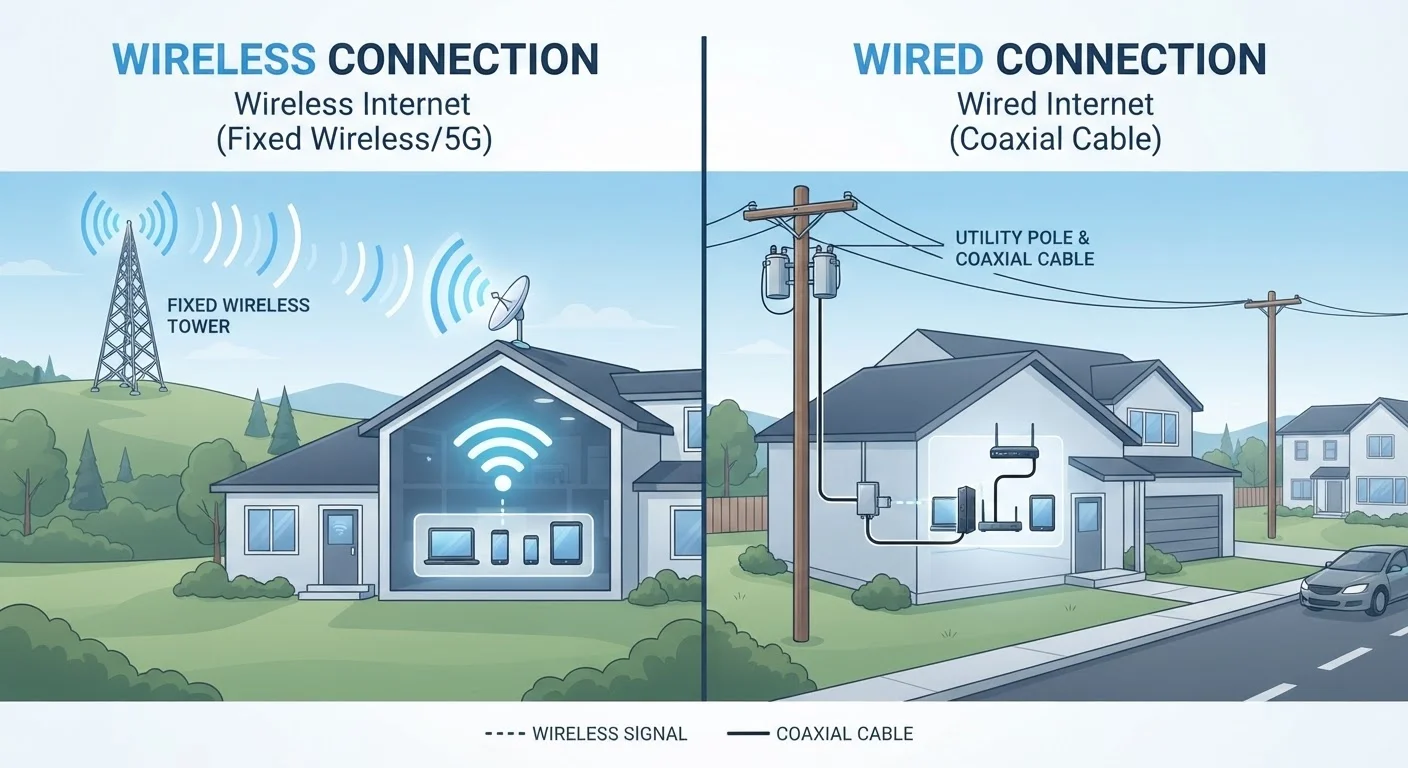
Fixed wireless internet transmits data as radio signals between a ground-based tower operated by the provider and a small antenna or receiver mounted on your home - typically on the roof, an exterior wall, or a window. That receiver connects to a router inside, distributing the connection to your devices. No cable needs to run from the street to your door. Because the signal travels through the air, a clear line of sight between your home and the tower is important; dense trees, hills, or tall buildings between you and the tower can degrade performance.
Cable internet uses the same coaxial cable infrastructure originally built for cable television. Data travels from the provider's network through buried or pole-mounted cables into a coaxial outlet in your home, where a cable modem converts the signal into a usable internet connection. Because the signal is carried over a physical line, it is largely unaffected by weather or obstructions. For a broader overview of how these and other technologies compare, see Home Internet Explained.
Speed, Latency, and Reliability
These three performance dimensions have the most direct impact on your daily experience.
| Criterion | Fixed Wireless | Cable Internet |
|---|---|---|
| Typical Download Speed | 25-300+ Mbps | 100 Mbps-1 Gbps+ |
| Typical Upload Speed | 10-50 Mbps | 10-50 Mbps (varies) |
| Typical Latency | 20-60 ms | 10-30 ms |
| Weather Sensitivity | Moderate (rain fade possible) | Low |
| Rural Availability | Expanding significantly | Limited in low-density areas |
| Installation Complexity | Antenna mount required | Coaxial line to modem |
| Infrastructure Required | Nearby tower + clear signal path | Coaxial cable network in area |
Speed: Cable plans in the United States commonly range from around 100 Mbps to 1 Gbps or more for downloads, with upload speeds that vary but are generally adequate for common household tasks. Fixed wireless download speeds typically range from 25 Mbps to 300 Mbps depending on the provider's network and local tower capacity, though some newer fixed wireless deployments using 5G spectrum can push beyond that. If you want to understand how speed claims translate to real-world use, common internet myths worth dispelling are a useful starting point before shopping plans.
Latency: Cable internet typically delivers latency (the delay in data transmission, measured in milliseconds) in the range of 10-30 ms, which is comfortable for gaming, video calls, and real-time applications. Fixed wireless latency can be slightly higher - often 20-60 ms - though this range is generally acceptable for most everyday uses, including streaming and video conferencing.
Reliability: Cable's wired physical path makes it resistant to weather fluctuations. Fixed wireless can experience signal degradation during heavy rain, dense fog, or severe storms - a phenomenon sometimes called rain fade - and heavy local network traffic on a shared tower can affect speeds during peak hours.
Availability: Where Each Option Reaches
Availability is often the deciding factor, and geography shapes it significantly.
Cable internet is widely available across urban and suburban areas where coaxial infrastructure has been built out over decades. However, in rural and remote communities, the economics of running cable lines to low-density areas have historically left many households without access.
Fixed wireless has expanded notably in recent years, partly driven by federal broadband funding programs and the rollout of 5G-spectrum fixed wireless services by major wireless carriers. Because it requires only a tower within range rather than buried cable, it can reach homes in areas that wired broadband has bypassed. That said, coverage still depends on tower proximity - typically within a few miles - and terrain matters. If neither fixed wireless nor cable is available in your location, it may be worth comparing satellite internet's trade-offs as an alternative. For a complete look at how all major technologies stack up, see our DSL vs. Cable vs. Fiber vs. Satellite comparison.
Installation, Equipment, and Practical Considerations
Before choosing, consider what each technology actually requires at your home.
Cable internet installation involves a technician connecting coaxial cable to a modem in your home. If existing cable outlets are present, setup is fairly straightforward. Equipment - modem and router - is either rented from the provider or purchased outright; owning your own compatible modem can reduce monthly costs over time.
Fixed wireless installation requires mounting an antenna or small dish on an exterior surface with clear signal access. A technician typically handles the installation and configures the indoor router. Renters should confirm with a landlord before mounting external equipment. One practical advantage: no cable needs to enter through walls or run across rooms.
Both services can be subject to data caps, though many providers in both categories now offer unlimited data plans. Pricing structures vary considerably by region and provider, so comparing plan details - not just headline speeds - matters. Fixed wireless using 5G networks is a rapidly evolving space; for context on how 5G spectrum affects home broadband performance, understanding 5G's real-world variation can help set accurate expectations.
Check Actual Availability at Your Address
Provider coverage maps are useful starting points but are not always accurate at the individual address level. Before committing to either service, contact providers directly to confirm availability and request an on-site assessment if signal strength is uncertain. The FCC's broadband map at broadbandmap.fcc.gov also provides a useful reference for understanding what's reported as available in your area.