

Key Takeaways
Our Verdict
No single protocol wins outright - each serves different needs. Wi-Fi suits bandwidth-hungry devices that need no hub. Zigbee works well for large, mixed-device networks with a compatible hub. Z-Wave is a strong fit for users prioritizing interference-free reliability with a manageable device count. Many smart home setups end up using more than one protocol simultaneously.
| Best for | Recommended |
|---|---|
| Those wanting simple plug-and-play setup without a hub | Wi-Fi |
| Those building a large network of sensors, bulbs, and switches | Zigbee |
| Those prioritizing signal reliability and minimal wireless interference | Z-Wave |
| Those building a future-ready system with broad compatibility | Matter over Thread (consider alongside Zigbee/Z-Wave) |
Why Wireless Protocols Matter for Smart Homes
When you add a smart bulb, a door lock, or a motion sensor to your home, that device needs a way to communicate - with your phone, your hub, and other devices. The method it uses is called a wireless protocol: a set of rules governing how signals are sent, received, and interpreted.
Choosing the wrong protocol for your setup can mean dropped connections, a congested Wi-Fi network, or devices that simply don't talk to each other. Understanding what Zigbee, Z-Wave, and Wi-Fi each do - and what they don't - helps you build a smart home that actually works reliably. For a broader look at how all these technologies fit together, see how smart home devices communicate.
How Each Protocol Works
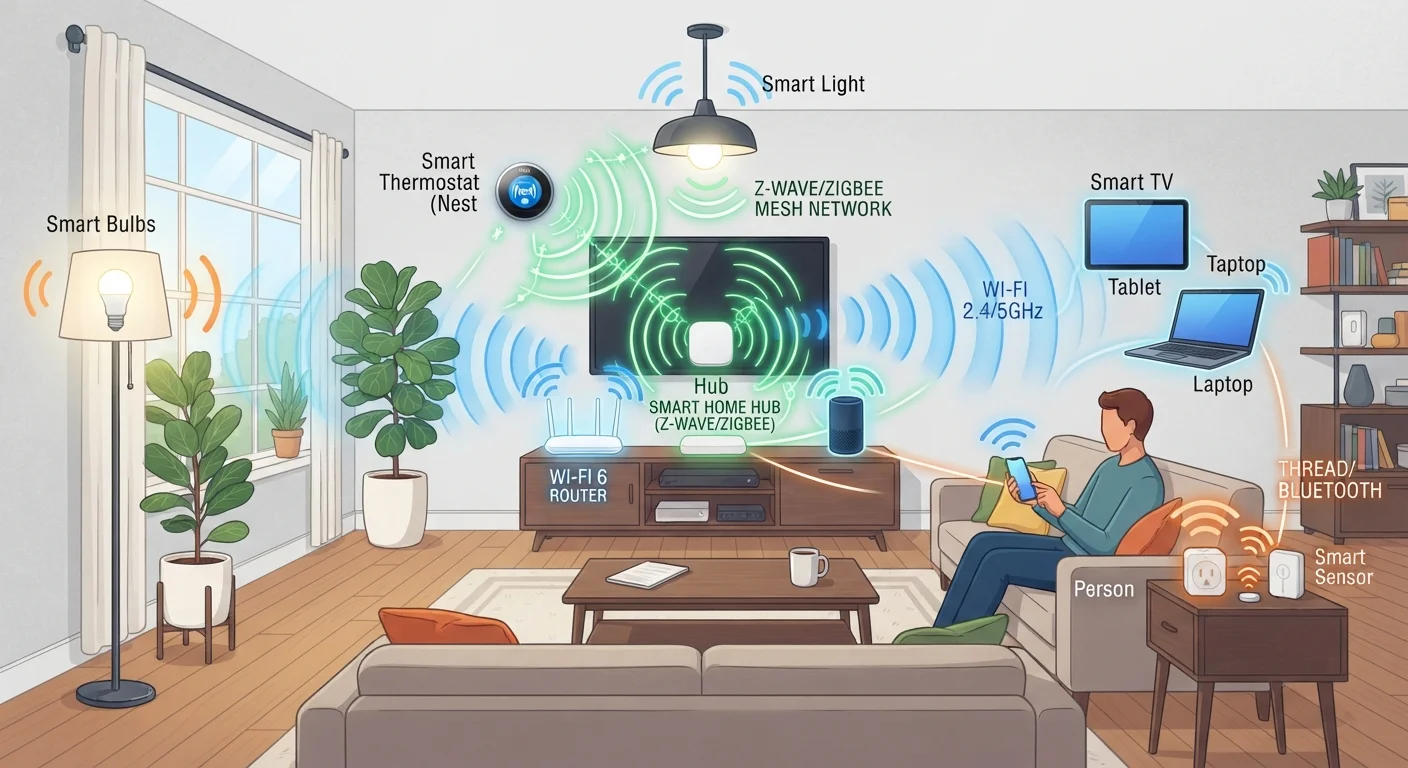
Wi-Fi is the most familiar protocol. Smart devices using Wi-Fi connect directly to your home router - no separate hub required. The trade-off is that each device claims a spot on your 2.4 GHz or 5 GHz network, and in a home with dozens of smart devices, that adds up fast. Wi-Fi also draws more power, which limits its use in battery-operated sensors.
Zigbee operates on the 2.4 GHz band (the same as many Wi-Fi routers and Bluetooth devices) but uses far less power. It's a mesh protocol, meaning devices relay signals through each other to extend range. Zigbee devices require a compatible hub or coordinator to connect to your broader network and apps. It supports large device counts - often 50 or more on a single network.
Z-Wave is also a mesh protocol, but it operates on a sub-gigahertz frequency (around 908 MHz in the US) that sits well below Wi-Fi and Bluetooth. This dedicated band significantly reduces interference. Z-Wave networks are capped at 232 devices per controller, which is ample for most homes. Like Zigbee, Z-Wave devices typically require a compatible hub.
| Wi-Fi | Zigbee | Z-Wave | |
|---|---|---|---|
| Frequency band | 2.4 GHz / 5 GHz | 2.4 GHz | ~908 MHz (US) |
| Hub required | No | Yes | Yes |
| Network type | Point-to-router | Mesh | Mesh |
| Power consumption | Higher | Very low | Very low |
| Interference risk | Moderate to high | Moderate | Low |
| Typical device limit | Router dependent | 50+ per hub | 232 per controller |
| Setup ease | Simple | Moderate | Moderate |
For a plain-language explanation of terms like "mesh networking" and "hub," the smart home glossary is a useful reference.
Key Trade-Offs to Weigh
Setup complexity: Wi-Fi devices generally connect through an app with minimal steps - no hub purchase required. Zigbee and Z-Wave both need a hub or smart home controller to function, which adds upfront cost and setup time but also provides a dedicated, more manageable network for your devices.
Network congestion: Every Wi-Fi smart device competes for bandwidth with your laptops, phones, and streaming devices. Zigbee and Z-Wave operate on separate frequencies (or sub-bands) and don't add load to your main Wi-Fi. If your home already has a busy wireless environment, mesh-based protocols can meaningfully reduce headaches.
Interoperability: Z-Wave devices are certified to a common standard, which improves cross-brand compatibility. Zigbee has a strong device ecosystem but compatibility between brands isn't always guaranteed without a shared hub platform. Wi-Fi devices typically rely on cloud platforms or voice assistants to connect across brands, which introduces its own dependencies. The emerging Matter standard aims to address cross-protocol compatibility - see how Thread and Matter are reshaping smart home compatibility.
Battery life: Zigbee and Z-Wave are purpose-built for low-power operation, making them well-suited for battery-powered door sensors, leak detectors, and remotes. Wi-Fi devices in the same categories typically drain batteries much faster.
Practical Guidance for Your Setup
If you're just starting out with one or two smart devices - a plug, a bulb, or a video doorbell - Wi-Fi is often the most practical starting point. No hub is needed, and setup is straightforward.
If you're planning a more extensive setup with sensors, locks, thermostats, and lighting spread across multiple rooms, investing in a Zigbee- or Z-Wave-compatible hub tends to pay off. Your main Wi-Fi network stays less cluttered, battery-powered devices last longer, and the mesh topology helps signals reach farther corners of your home.
Many households end up running more than one protocol at once - for example, Zigbee for lighting and Z-Wave for door locks - managed through a central hub that bridges them. This is normal and workable, though it does add a layer of complexity to troubleshoot. For help organizing the network side of things, setting up a smart home network offers practical guidance.