

Key Takeaways
Option A
Fiber Internet
The high-performance, future-ready connection.
Best for: Households that demand fast, symmetrical upload and download speeds with rock-solid reliability.
Option B
Cable Internet
The widely available, proven broadband standard.
Best for: Households in areas where fiber hasn't arrived yet, or where high download speeds are the primary need.
If you work from home and frequently upload large files or join video calls
Fiber Internet
Fiber's symmetrical speeds mean uploads are as fast as downloads, eliminating the bottleneck that cable connections create for video conferencing and cloud-based work.
If fiber isn't available in your area
Cable Internet
Cable reaches the vast majority of U.S. homes and delivers download speeds that comfortably handle streaming, browsing, and casual gaming for most households.
If you're a competitive or latency-sensitive online gamer
Fiber Internet
Fiber's consistently low latency and resistance to peak-hour congestion provide a more stable gaming experience than cable, where shared bandwidth can cause lag spikes.
If your household streams video across multiple devices simultaneously
Fiber Internet
Fiber handles simultaneous high-bandwidth demands more gracefully, especially during evenings when cable networks tend to slow due to neighborhood-wide congestion.
If you primarily browse, email, and stream on one or two devices
Cable Internet
For lighter usage, cable's download speeds are more than sufficient, and its wider availability makes it the practical choice for most households.
How Each Technology Actually Works
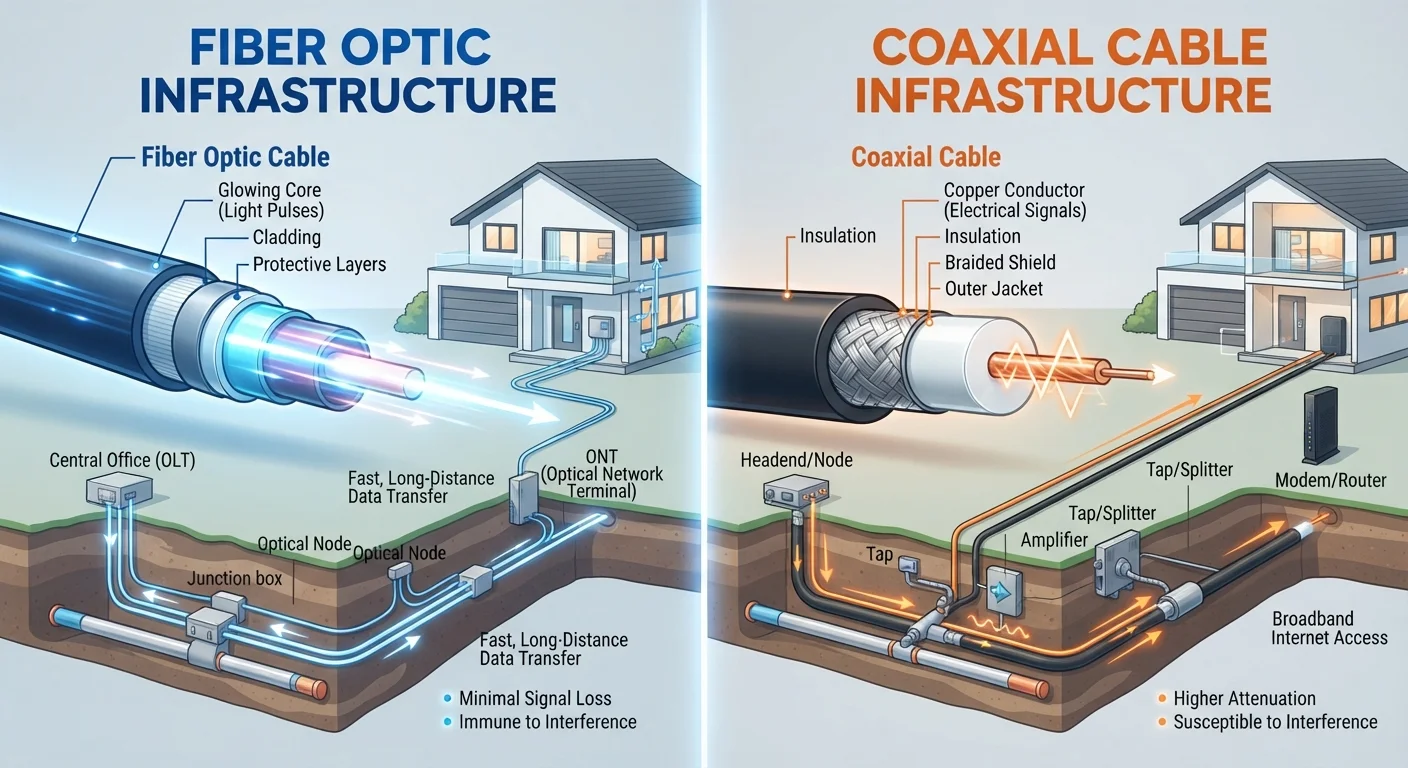
Understanding the physical difference between fiber and cable internet helps explain nearly every performance gap between the two.
Fiber optic internet transmits data as pulses of light through thin strands of glass or plastic. Because light travels at - well, the speed of light - fiber can carry enormous volumes of data over long distances with minimal signal degradation. The connection running from your ISP's network to your home (called the last mile) is also fiber, which means the high-performance properties extend all the way to your router.
Cable internet uses coaxial cable - the same copper-based infrastructure originally built for cable television. Electrical signals carry data through these lines. Cable technology has improved dramatically over the years through standards like DOCSIS (Data Over Cable Service Interface Specification), with DOCSIS 3.1 enabling multi-gigabit speeds on modern networks. However, coaxial lines are more susceptible to signal interference and distance-related degradation than fiber.
For a broader look at how these and other connection types compare, see Home Internet Explained.
Speed and Latency: Where the Differences Show Up
Raw speed numbers don't tell the full story. The shape of those speeds - and how consistently they're delivered - matters just as much for everyday use.
| Criterion | Fiber Internet | Cable Internet |
|---|---|---|
| Infrastructure | Glass/plastic fiber optic strands | Coaxial copper cable |
| Signal type | Light pulses | Electrical signals |
| Download speeds | Up to multi-gigabit | Up to multi-gigabit (DOCSIS 3.1) |
| Upload speeds | Typically symmetric (equal to download) | Typically much slower than download |
| Latency | Generally lower | Generally higher |
| Peak-hour congestion | Less affected | More affected (shared nodes) |
| U.S. availability | Growing; concentrated in urban/suburban areas | Widely available; most U.S. households |
Upload speed is where fiber pulls ahead most decisively. Cable plans are typically asymmetric, meaning download speeds are far higher than upload speeds. A cable plan advertised at 500 Mbps download might offer only 20-50 Mbps upload. Fiber plans are commonly symmetric - 500 Mbps in both directions. For uploading videos, backing up files to the cloud, or joining a video call where your outgoing stream matters, that difference is significant.
Latency - the time it takes a data packet to travel to its destination and back, measured in milliseconds - is another area where fiber tends to perform better. Lower latency makes real-time applications like video calls, cloud gaming, and multiplayer gaming feel more responsive.
If you're unsure how much speed your household actually needs, this guide to matching speed to usage can help you work it out.
Reliability and Congestion
Cable internet is a shared medium in a meaningful way: many homes in a neighborhood share the same network node. During peak usage hours - typically evenings when everyone is streaming - that shared capacity can become congested, leading to slower speeds for everyone on the segment.
Fiber networks are generally less susceptible to this kind of congestion, partly because fiber has substantially more theoretical bandwidth capacity and partly because many fiber deployments use more direct, dedicated pathways to individual homes.
What 'Shared Network' Means in Practice
On a cable network, your neighborhood shares bandwidth through a common node before traffic reaches the wider internet. During quiet daytime hours, this rarely causes problems. During peak evening hours, a heavily loaded node can reduce speeds noticeably. ISPs manage this by upgrading node capacity, but the experience can vary significantly by provider and location.
This doesn't mean cable is unreliable - modern cable infrastructure managed by well-resourced ISPs is generally quite dependable for everyday use. But it does mean cable performance can be less predictable during peak hours compared to fiber.
Weather and physical interference affect both technologies, though coaxial copper lines can be more vulnerable to corrosion and electrical interference over time than fiber strands.
Availability: The Deciding Factor for Many Households
For a significant portion of American households, the fiber vs. cable debate is settled by geography, not preference. According to the FCC's broadband data, cable internet reaches the majority of U.S. residential addresses, while fiber availability - though growing rapidly - remains concentrated in urban and suburban markets. Rural areas are often served by neither, relying instead on DSL, fixed wireless, or satellite.
~85%
U.S. homes with access to cable broadband
The FCC's broadband data indicates cable infrastructure reaches the large majority of U.S. residential addresses, far outpacing fiber's current footprint.
~43%
U.S. homes with access to fiber broadband
Fiber availability has grown steadily but remains well below cable's reach, according to FCC coverage data - with significant gaps in rural and some suburban markets.
If you're evaluating all your options - not just fiber and cable - this side-by-side comparison of all four major internet types offers a fuller picture. And if fixed wireless is available in your area, this look at fixed wireless vs. cable is worth reading before you decide.
Which Connection Fits Your Household?
There's no universal answer, because the right connection depends on your usage patterns, the number of people in your home, and what's actually available at your address.
Fiber is the stronger choice if you have access to it and your household includes remote workers, heavy uploaders, avid gamers, or multiple simultaneous streamers. Its consistent speeds and low latency make it more resilient under real-world household demand.
Cable remains a capable, widely accessible option for households with moderate needs - primarily downloading content, browsing, and standard video calls. A well-provisioned cable plan at adequate speeds handles most everyday tasks without issue.
Before signing any contract, it's worth examining the common assumptions that lead people to overpay or under-plan. Common internet myths that cost people money separates fact from fiction on topics like advertised speeds, equipment fees, and bandwidth marketing claims.
If your home uses smart devices, connected cameras, or automation systems, reliable and low-latency broadband matters even more - explore how connectivity intersects with your setup at our Smart Home Tech hub.